POST /api/events
POST /api/eventsAuthorization: Bearer hive_…Content-Type: application/jsonThe body is a JSON object. Every field is optional, but an event needs at least a title, message, data, image, prompt or workflow.
Fields
Section titled “Fields”| Field | Type | Default | What it does |
|---|---|---|---|
title |
string, up to 120 characters | A short headline, shown in Activity and in the notification. | |
message |
string, up to 2,000 characters | A sentence or two saying what happened. | |
data |
any JSON | Anything at all: a detection, a reading, a payload. Shown in Activity under Event data, and given to the agent. | |
image |
string | A small picture as a data: URL: PNG, JPEG, GIF or WebP, up to 256 KB once decoded. Shown with the event. |
|
importance |
"normal", "high" or "urgent" |
"normal" |
High and urgent events stay in Needs attention until acknowledged. |
announce |
boolean | true |
Post the event to Activity. |
push |
boolean | false |
Send a notification to your Mac (with Settings → General → Notifications on) and to your paired phones. |
agent |
string, up to 64 characters | The agent that should act on the event. Use "hive" for the coordinator (My team), or an agent’s handle, like "weather". |
|
prompt |
string, up to 4,000 characters | What that agent should do with the event. Needs agent. |
|
workflow |
string, up to 80 characters | Instead of agent and prompt: the name of an automation to start (upper and lower case don’t matter). See Starting automations. |
|
dedupe |
string, up to 200 characters | A key for repeats. Another event with the same dedupe within cooldown seconds is logged but otherwise ignored. |
|
cooldown |
number of seconds, 0 to 86,400 | 300 |
How long dedupe holds. |
The whole body can be up to 512 KB.
Finding an agent’s handle
Section titled “Finding an agent’s handle”An agent’s handle is shown under its name in its settings (the cog on its card), like @computer. Leave off the @. Use "hive" to give the event to My team, which can bring in whichever agents it needs.
What happens to an event
Section titled “What happens to an event”- Agent City checks the key and the body, and answers straight away.
- If
announceis true, the event appears in Activity with a lightning icon. The coordinator knows about it, so you can ask My team about it later (“who just arrived?”). - If
pushis true, a notification goes to your Mac and your paired phones. - If there’s an
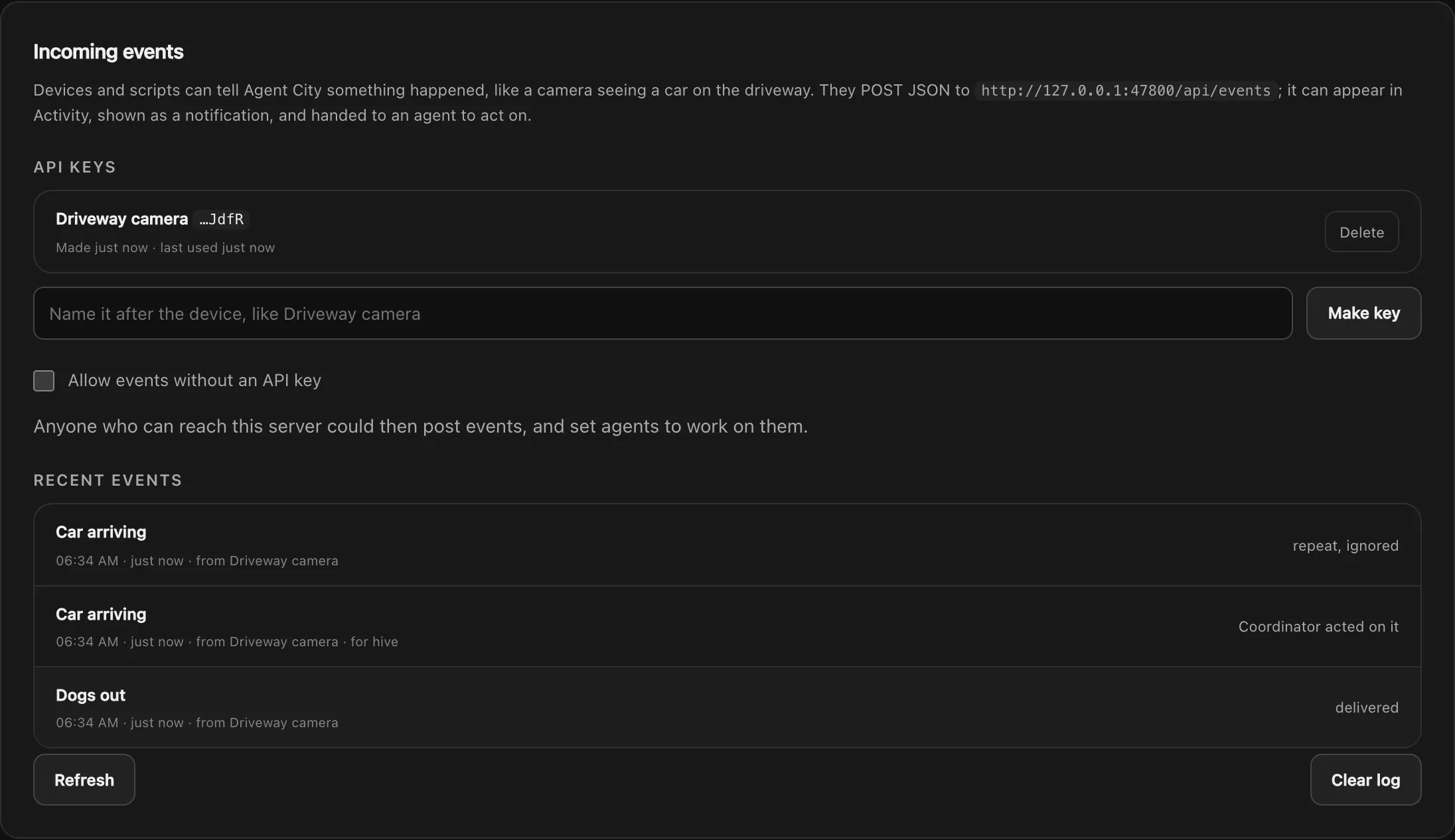
agent, it acts on the event in a fresh conversation, alongside everything else. Its reply is posted to Activity (when the event announces). If there’s aworkflow, that automation starts instead. If the automation is already running, this event doesn’t start a second run; Recent events shows It was still running.
The announcement and notification don’t wait for the agent. The agent works like an automation step: nobody is there to answer its questions, so make the prompt complete.
An agent is told when an event has a picture, but can’t see it.
Responses
Section titled “Responses”| Status | Body | Meaning |
|---|---|---|
202 Accepted |
{"id": 2} |
The event was received. Any agent or automation is now working on it. |
200 OK |
{"id": 3, "deduped": true} |
A repeat of a recent event with the same dedupe key. It was logged, but nothing else happened. |
4xx |
{"error": "…"} |
Something’s wrong. The message says what. |
Errors
Section titled “Errors”| Status | error |
|---|---|
400 |
The body isn't valid JSON. |
400 |
Send a JSON object. |
400 |
Send at least a title, message, data, image or prompt. |
400 |
<field> must be a string. |
400 |
<field> is too long (at most <n> characters). |
400 |
announce must be true or false. (and the same for push) |
400 |
importance must be normal, high or urgent. |
400 |
cooldown must be a number of seconds, up to a day. |
400 |
A prompt needs an agent to give it to. |
400 |
Send a workflow, or an agent with a prompt, not both. |
400 |
There's no agent called '<agent>'. |
400 |
There's no workflow called '<workflow>'. |
400 |
That workflow doesn't start from events. Set its trigger to an incoming event. |
400 |
That workflow is paused. |
400 |
image must be a data: URL of a PNG, JPEG, GIF or WebP, like data:image/jpeg;base64,…. |
400 |
image isn't valid base64. |
400 |
image is too big (at most 256 KB). Send a smaller or more compressed one. |
400 |
image doesn't look like a <TYPE>. |
401 |
See Authentication. |
413 |
Events can be at most 512 KB. |
Recent events
Section titled “Recent events”Settings → Devices → Incoming events → Recent events lists the last 500 events and what happened to each. Click one to see its payload. Clear log empties it. Only the newest 100 events keep their pictures.